Home > Projects > DIY Devices > Multipexer

DIY Sensor Multipexer
Shop Menu
Home
Login
Cyber Circuits Cyber Circuits

Science LabScience Lab

Surplus Items Surplus Items
Custom ElectronicsCustom Electronics & Software
Education Educational Resources
Other Services

Custom Electronics

Need a custom electronic device?
Bespoke Electronic SolutionsWe offer bespoke solutions for electronics and software covering a wide range of uses.

Click here for more information


Sponsored Links

DIY Sensor Multiplexer

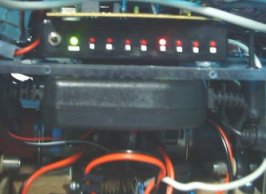
Multiplexer installed on a  DIY RobotThis device was created to allow more analog sensors to be added to a homemade robot. It is simply a 8 port switcher for analog or digital signals. The device is controlled by a PIC 12F675 microcontroler, and gives eight analogue outputs from one analogue input, and one digital input.

The K8000 computer interface board, used on the robot, is limited to four analogue inputs. A multiplexer was essential in order to capture more sensor data. The multiplexer can allow the computer to capture data from several sensors using a single analogue input on the K8000.

To do this it was necessary to create a device that could switch eight digital outputs one at a time and be controlled by 1 digital input from K8000. This is very similar to ‘running lights’ where several LED’s run in sequence and start again. To keep the multiplexer small it was decided that a PIC microcontroler would be used, as this would greatly reduce the number of required components. The chosen PIC was the 12F675 because of its small size (8 pin) and the low cost of the chip programmer. This PIC has only four digital outputs so these also needed to be multiplexed. The digital outputs when low can be used like a ground connection, allowing LEDs to be connected directly across two outputs as shown below.
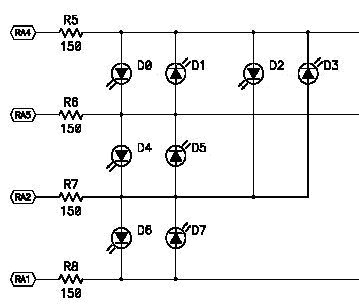
Stage 1 - Multiplexing the outputs on a PIC Microcontroler

The diagram above shows how four outputs of a PIC can be used to control 8 LEDs. If these LEDs are inside an optoisolator then they can be used to trigger transistors, allowing a sensor to pass data to the computer. The diagram below is intended to show the connections of the sensor multiplexer. This diagram does not show some components such as resistors and capacitors, and is intended only as a guide.
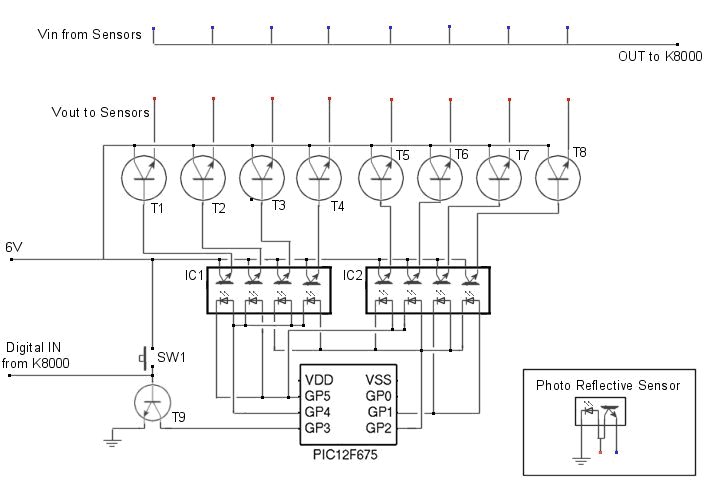
Click for Full Size Image

To capture sensor data from the multiplexer a subroutine named ‘GetPlexer’ was created in the robots main code. This loop can read the value of the analogue input on the K8000, store it in an array, and then switch the digital output to the multiplexer on and then off again. This process will loop until all 8 sensors have been read.

For plex = 1 to 8
ReadADChannel 2
Sen%(plex)= ad%(2)
SetIOChannel 9
ClearIOChannel 9
Next plex
'
‘Calls subroutine to get value of AD channel
‘Stores the value of AD channel in array position plex
‘Tells multiplexer to move to next sensor
‘Clears IO channel ready for next loop
'

When power is connected the first sensor in the array will be active. It would be as if it were connected directly to the analogue input of the K8000. When the signal from the digital output of the K8000 goes from low to high the power to the first sensor is disconnected and the next sensor is activated. This process repeats until the last sensor is activated and then it starts again from the beginning. This was housed in a plastic box and jack sockets added to allow easy connection and removal of sensors
K8000 etc

Science Menu

Research projects Research Projects

DIY ProjectsDIY Projects & Experiments
CyberneticsCybernetics & Virtual Worlds
High VoltageHigh Voltage
PropulsionPropulsion Systems
PhysicsPhysics & Formula

Info Box

Power Pulse ModulatorPower Pulse Modulator
Variable Frequency, Variable Pulse Width, up to 100A DC Pulse Control Circuits More....

We Ship Worldwide

Customer Feedback

"Awesome job guys, thanks!"

"Thanks my PPM works flawlessly it's the best coil driver I have ever used!"

"Fantastic kit, arrived promptly and very easy to assemble. One step closer to tesla madness!!!"


Sponsored Links

Questions and Comments on the DIY Multipexer / Decoder for Analog or Digital Signals

The information provided here can not be guaranteed as accurate or correct. Always check with an alternate source before following any suggestions made here.
GeneratorSaturday, 4th April 2009 5:44am - No.3737
In the diagram, Showing how control 8 LED's with only 4 output pins on the microcontroller, Is it possible to have all the LED's on at once?
 
RMCyberneticsSaturday, 4th April 2009 11:20am - No.3738
No, it is not possible. If you ran it fast enough you could make it appear like they were all on at once.
 
GeneratorSaturday, 4th April 2009 1:51pm - No.3743
Oh.

Which pins can I multiplex on a PIC18F4550? http://ww1.microchip.coam/downloads/en/DeviceDoc/39632D.pdf
 
RMCyberneticsSunday, 5th April 2009 2:46am - No.3744
Any of the digital I/O ports
 
GeneratoSunday, 5th April 2009 9:54am - No.3745
Oh, So I can't use the analog ports?
 
GeneratorSunday, 5th April 2009 11:25am - No.3746
And I'm guessing you can't use input pins?
 
RMCyberneticsWednesday, 8th April 2009 1:15am - No.3752
They are the same pins. You just configure them as input or output in your code.
 
GeneratorWednesday, 8th April 2009 7:47am - No.3755
But the analog pins are still useless in this design, right?

By the way, Thanks for all the times you've helped me.
 
RMCyberneticsFriday, 10th April 2009 2:53pm - No.3760
Yes
 

Click the button to leave your comment or question
Power PWMHigh Power Pulse Width Modulated Signal Generators High Power HHO ElectrodesElectrodes for Hydrogen and Oxygen production Power Pulse ModulatorVariable Frequency PWM Circuits Aura Plasma Photography PlatesAura Photo Electrodes

© 2010 All Rights Reserved

About Us | Terms of Use | Services